neoSlice 2.5
3D printing,
dialed in for you.
Drop in your model. neoSlice analyzes the part, picks the right settings and exports a print-ready file. You stay in control, without the headache.
Free. Windows 10/11 and Macs with M2 or newer. Discover neoSlice Pro ›
How it works
Three steps. No manual tuning.
It spots the weak points
Overhangs, stability, fragility. neoSlice inspects your part and flags what is likely to fail.
Your intent becomes settings
Quality, strength, speed, supports, bed adhesion. You choose from menus, neoSlice turns it into optimized parameters.
A file ready to open
The file lands in your slicer with every parameter already in place. All that's left is to hit print.
Analysis
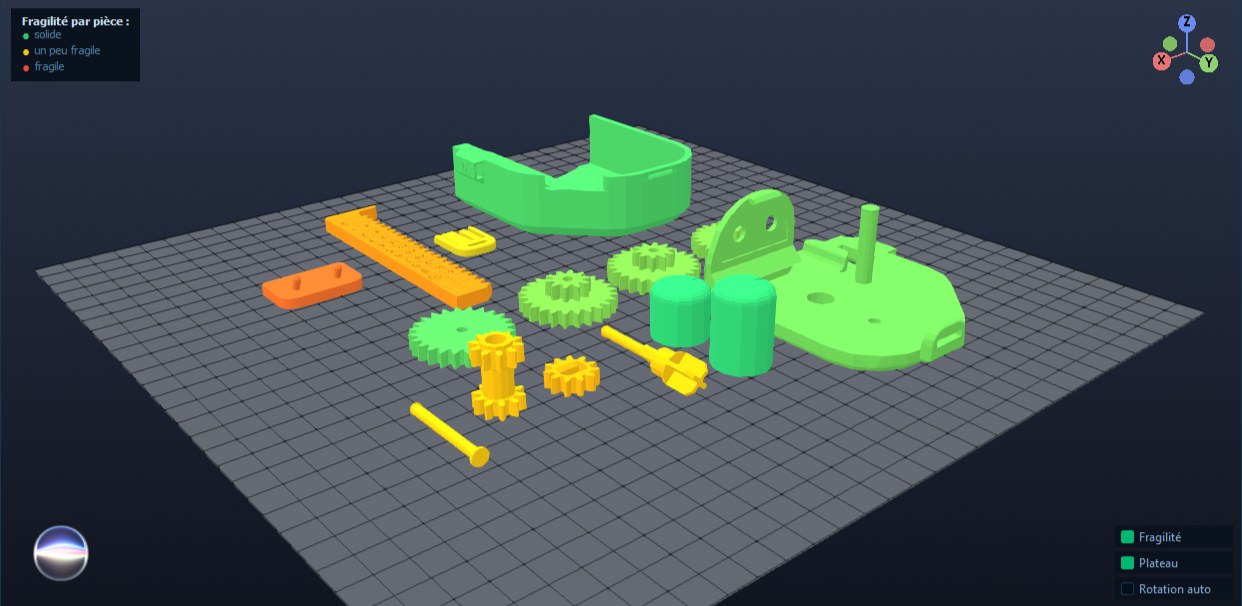
See how strong every part is.
The fragility map colors every part on the plate by strength. Green for solid, red for fragile. You know what to reinforce before you even start printing.
Compatibility
One tool for all your hardware.
Bambu Studio, OrcaSlicer, PrusaSlicer, CrealityPrint, ElegooSlicer, AnycubicSlicer, Snapmaker Orca, UltiMaker Cura and FlashPrint. The catalog adapts to the slicer you choose.
3D design
neoForge, the 3D modeler.
Can't find the part you need anywhere? Draw it. Place a shape, stretch it with the mouse, drill holes, round the edges, measure from point to point. When it's ready, it goes to neoSlice in one click.
Cube, cylinder, sphere, cone, torus, gear, frames. Threaded holes and nut pockets, M2 to M12. Fillets and chamfers. Plane cut. Measuring tool.
Included in neoSlice Pro. Windows and macOS.
Go further
What if neoSlice made your parts too?
Where neoSlice optimizes your prints, the Pro version goes further: it generates the objects you're missing, lets you draw the ones that don't exist, fixes your failed prints and runs your whole workshop.
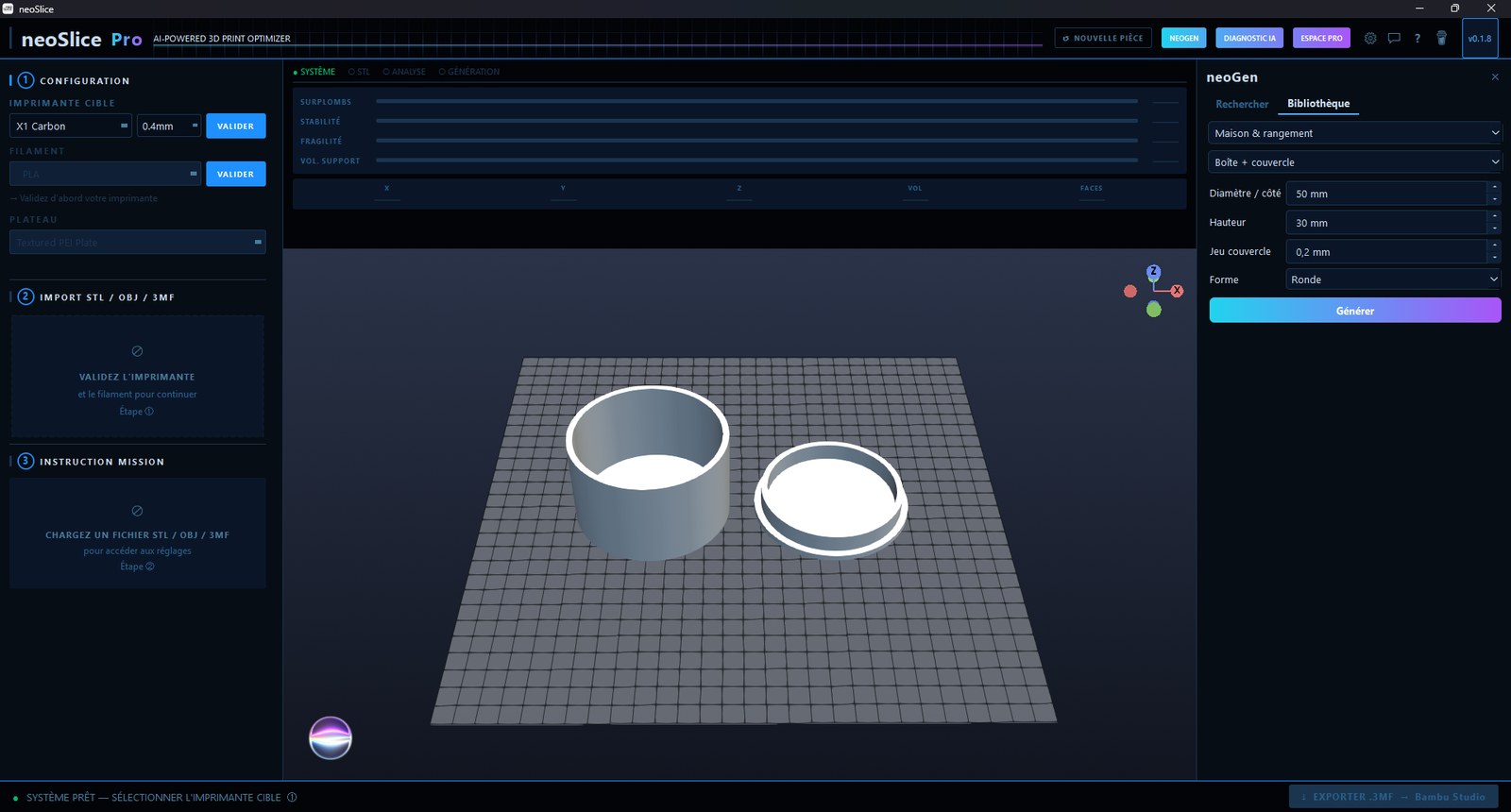
neoGen, the custom object generator. neoForge, the 3D modeler. Oen, the 100% local AI assistant. Photo diagnosis of failed prints. Multicolor export. Quotes, invoices and customers.
Free and Pro
Free to optimize.
Pro to go further.
neoSlice
Free, forever
- Overhang, stability and fragility analysis
- Automatic print settings
- STL, OBJ, 3MF import and export to 9 slicers
- Fragility map and auto performance mode
neoSlice Pro
€79.99 excl. tax, one-time payment, for life
- neoGen, the custom object generator
- neoForge, the built-in 3D modeler
- Oen, the 100% local AI assistant
- Photo diagnosis of failed prints
- Multicolor export and stock tracking
- Workshop management: quotes, invoices, customers
They print with neoSlice
Happy makers,
from beginners to pro shops.
Reviews translated from French.
I printed in 3D for the first time this week. I dropped in my file, neoSlice set everything up, and it came out right the first time. I never had to figure out what "retraction" meant.
I have a somewhat exotic Sunlu and expected a struggle. It was on the list, with the right build plate and the right temperatures. Honestly impressed by the hardware coverage.
Workshop management replaced my spreadsheet. Quotes, multilingual invoices, spool tracking: I bill customers abroad without pulling out the calculator. The one-time payment paid for itself in two orders.
Oen runs locally, with no internet, and it actually answers my questions about my settings and my printer. It's the first time an AI assistant in a piece of software has been useful to me instead of selling me hot air.
With neoGen I made an engraved keychain and a mailbox plate without opening any modeling software. I type my text, pick the shape, and it's ready to print. It changed the way I create.
What won me over was the fragility map. It showed me a part that was too thin, in red, before printing. I reinforced it, and I didn't waste a spool for nothing.
I juggle a Bambu at home and a FlashForge at the makerspace. One tool that exports for both, each in the right format. It saves me from relearning two slicers.
Photo diagnosis of failed prints is worth the price on its own. I take a picture of the botched print, it tells me what's wrong and what to fix. I solved a warping problem that had been dragging on for months.
My printer had just come out and I didn't expect to find it. One small update and there it was. The catalog really keeps up with the market, which builds trust for the long run.
A clear interface, in French, that doesn't drown you in 200 parameters. I choose my intent from menus and it becomes settings. Perfect for learning without getting discouraged. One star off because I'd love even more video tutorials.
Multicolor export with filament usage per color is exactly what I needed to price my two-color parts. I know how many grams of each spool I'll use before I start.
I generated a temperature tower and an overhang test straight from the library, without hunting for files online. Everything is built in. Calibrating a new spool takes two minutes.
Ready to print better.
Free. Windows 10/11 and Macs with M2 or newer.
Installation help
Blocked when opening it?
Let's fix that in a minute.
Windows and macOS sometimes show a warning for independent software. That's normal, and it takes two clicks to get past it. Follow the guide for your system.
neoSlice is safe. These warnings don't mean there's a virus: they appear because neoSlice is a recent piece of software, published by an independent studio and not signed by a major publisher. The installation files are published on GitHub, the go-to platform for developers.
1"neoSlice_Setup_Windows.exe isn't commonly downloaded" (while downloading)⌄
This window appears during the download, before installation even starts. The catch is that the only clearly visible button is Delete: if you click it, the file is erased and nothing gets installed.
- Don't click Delete. Click the small arrow just to the right of the word Delete.
- Choose Keep in the menu that opens.
- If Windows insists with a Show more link, click it, then Keep anyway.
- The file finishes downloading. You can open it: the next step is waiting for you.
Why? Windows looks at how many people have already downloaded this file. neoSlice is a recent piece of software from an independent studio: the count is low, so the warning appears. It says nothing about what the file contains.
2"Windows protected your PC" (blue SmartScreen screen)⌄
This is the most common warning. It doesn't block the file, it just asks you to confirm.
- Click More info (the small link under the text).
- A Run anyway button appears at the bottom. Click it.
- Installation starts normally.
3"MSVCP140.dll" or "VCRUNTIME140.dll" is missing⌄
These files are part of a Microsoft component most PCs already have. If it's missing, install it for free:
- Download Microsoft's Visual C++ Redistributable (x64): aka.ms/vs/17/release/vc_redist.x64.exe
- Run it, accept, let it install (10 seconds).
- Restart neoSlice. The message is gone.
4The download stops, or I get a ".crdownload" file⌄
A .crdownload file (or .partial in Edge) is an unfinished download. The browser interrupted or paused the save.
- Open the browser's downloads (Ctrl + J).
- If the file is paused, click Resume. If it's flagged as dangerous, click Keep, then Keep anyway.
- Wait until the extension is back to .exe (Windows) or .zip (Mac) before opening it.
Tip: if it's still stuck, restart the download from the official link, or try another browser.
5My antivirus quarantines or deletes the file⌄
Some antivirus programs are overzealous with new independent software (a "false positive"). You can safely allow neoSlice.
- Open your antivirus and go to Quarantine or Threat history.
- Select neoSlice and choose Restore, then Allow (or "Add an exclusion").
- Run the installation again.
In Windows Defender: Windows Security → Virus & threat protection → Protection history → Actions → Allow.
6neoSlice installs but won't open, or closes right away⌄
- Fully close neoSlice if it was already running (icon in the taskbar).
- Right-click → Run as administrator the first time.
- The first launch prepares the 3D display: give it a few seconds.
- Still nothing? Reinstall the latest version from the official link, then restart the PC.
Windows 10 and 11 (64-bit).
1"neoSlice can't be opened" or "Apple could not verify…"⌄
This is Gatekeeper, macOS security. You only need to unlock it once, and this method works on every version of macOS:
- Double-click neoSlice in the Applications folder. The warning appears: close it with Done or OK.
- Open System Settings → Privacy & Security.
- Scroll down to the Security section: a message mentions neoSlice with an Open Anyway button.
- Click it, then confirm with your password or Touch ID.
- It's remembered: from then on, neoSlice opens with a normal double-click.
2Shortcut on macOS 12 to 14 (Monterey, Ventura, Sonoma)⌄
On these versions, a right-click gets you there faster. Apple removed it in macOS 15 Sequoia: use step 1 instead.
- In the Applications folder, right-click (or Ctrl-click) neoSlice.
- Choose Open from the menu.
- The same warning comes back, but this time with an Open button. Click it.
3"neoSlice is damaged and can't be opened"⌄
This misleading message comes from the quarantine flag macOS puts on files downloaded from the internet. The app isn't actually damaged. Two solutions:
Simple: delete neoSlice, download the .zip again, unzip it, and drag neoSlice into Applications before following step 1.
If it persists, open the Terminal app and paste this line (it simply removes the quarantine flag):
xattr -dr com.apple.quarantine /Applications/neoSlice.appPress Return, then open neoSlice normally.
4The .zip won't unzip, or the app stays as ".download"⌄
- Check that the download is finished: a .download file is still in progress.
- Double-click the .zip: macOS creates the app right next to it.
- Drag neoSlice into your Applications folder, then launch it from there (on first launch, follow step 1).
Mac with an Apple M2 chip or newer, macOS 12 Monterey or later. M1 Macs and Intel Macs are not supported.
Still stuck?
We'll get you unblocked personally.
Tell us what you see (the exact message, a screenshot if possible) and your system. We'll reply with the steps to follow.